Last Updated: February 26, 2026
Overview
ReferVo uses SMS messaging to facilitate referrals and provide notifications to users. We are committed to obtaining proper consent before sending any SMS messages. This page explains our consent collection process for both app users and referred leads.
Consent for App Users
Account Registration
When users create a ReferVo account, they provide their phone number and agree to our Terms of Service and Privacy Policy. This establishes consent for essential account-related SMS messages such as verification codes.
SMS Notification Preferences
For ongoing SMS notifications (new leads, connection requests, payments), users must explicitly opt in through the app's notification settings:
- Users navigate to Profile → Notifications
- Under "SMS Notifications," users see toggle switches for each notification type
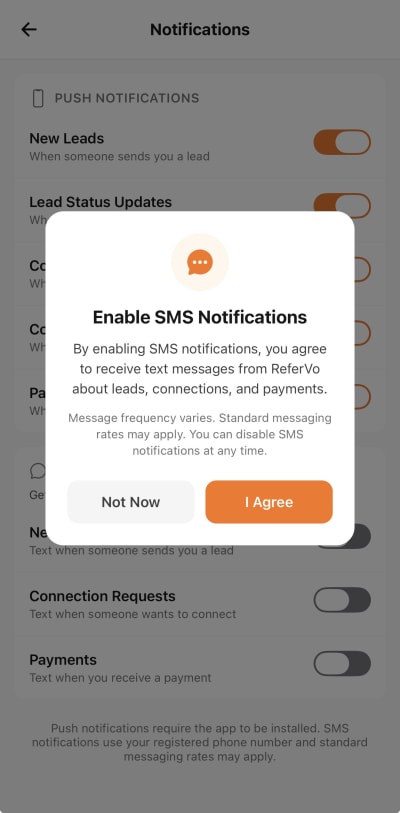
- When a user attempts to enable any SMS notification for the first time, a consent modal appears
- The modal clearly states: "By enabling SMS notifications, you agree to receive text messages from ReferVo about leads, connections, and payments."
- Users must tap "I Agree" to enable SMS notifications
- This consent is recorded in our database with a timestamp
SMS Notification Consent Modal
Users can disable SMS notifications at any time through the app settings or by replying STOP to any message.
Consent for Referred Leads
Two-Step Consent Process
When a ReferVo user sends a referral, the process includes multiple consent checkpoints:
Step 1: Sender Confirmation
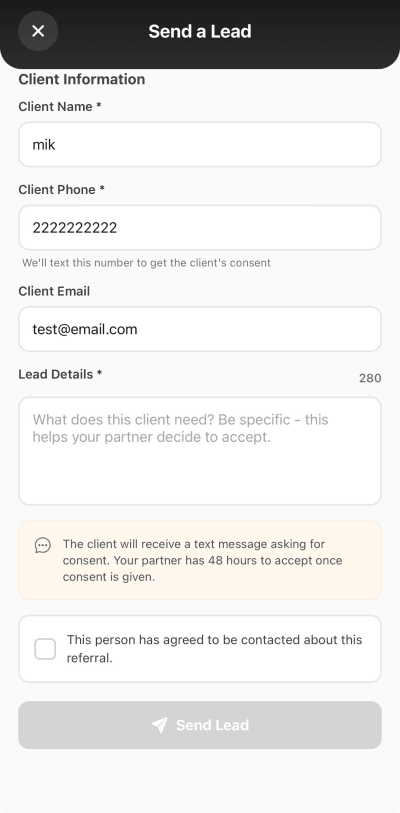
Before sending any lead, the referring user must check a box confirming:
"This person has agreed to be contacted about this referral."
This ensures the sender has obtained verbal or written permission from the lead before entering their information into ReferVo.
Send Lead Consent Confirmation Checkbox
Step 2: Lead Verification via SMS
After the sender confirms consent, ReferVo sends a single SMS to the referred lead asking them to verify their consent:
"Hi [Name], [Sender Name] wants to refer you through ReferVo. Reply YES to consent or NO to decline. Msg&data rates may apply. Reply STOP to opt out."
The lead's response determines the next steps:
- YES: Consent is recorded, and the referral proceeds to the receiving business
- NO or no response: No further messages are sent, and contact information is not shared
- STOP: The number is added to our opt-out list and will never receive messages from ReferVo
Message Types and Frequency
For App Users
| Message Type | Frequency | Consent Required |
|---|---|---|
| Verification codes | As needed | Account registration |
| New lead alerts | Based on activity | SMS opt-in modal |
| Connection requests | Based on activity | SMS opt-in modal |
| Payment notifications | Based on activity | SMS opt-in modal |
For Referred Leads
| Message Type | Frequency | Consent Required |
|---|---|---|
| Consent request | One per referral | Sender confirmation checkbox |
Opting Out
All recipients can opt out of SMS messages at any time:
- Reply STOP to any message from ReferVo
- App users: Disable SMS toggles in Profile → Notifications
- Contact us: Email support@refervo.com
After opting out, you will receive a confirmation message and no further SMS messages will be sent.
Data Protection
- Phone numbers are stored securely and encrypted
- Consent records include timestamps and are retained for compliance
- Phone numbers are never sold or shared for marketing purposes
- Opt-out requests are processed immediately
Contact Us
If you have questions about our SMS consent practices:
- Email: support@refervo.com
- Reply HELP to any SMS message